// AI App Store screenshots

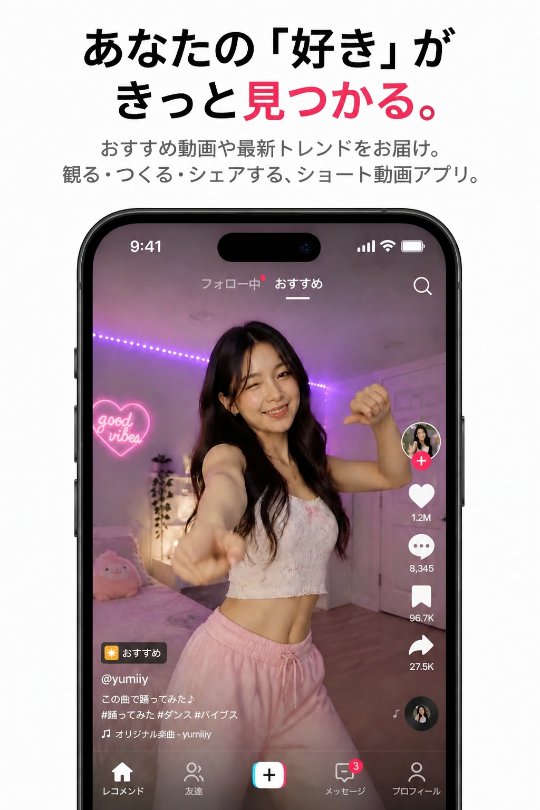
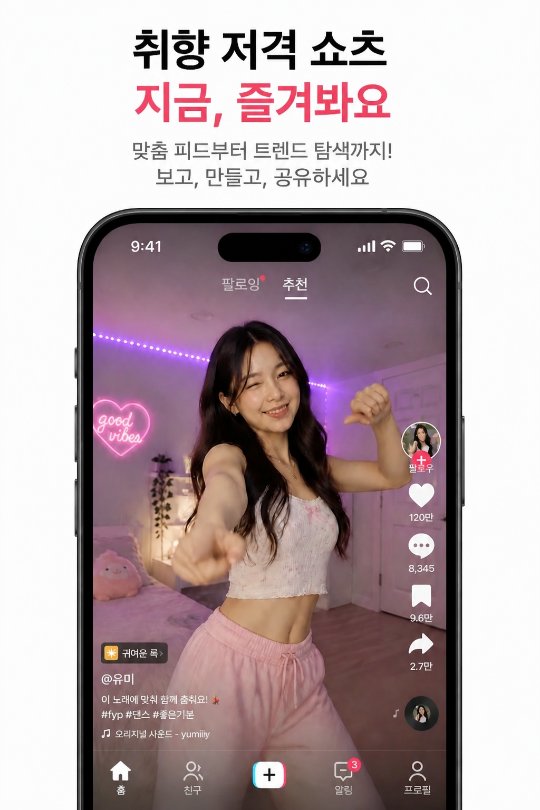
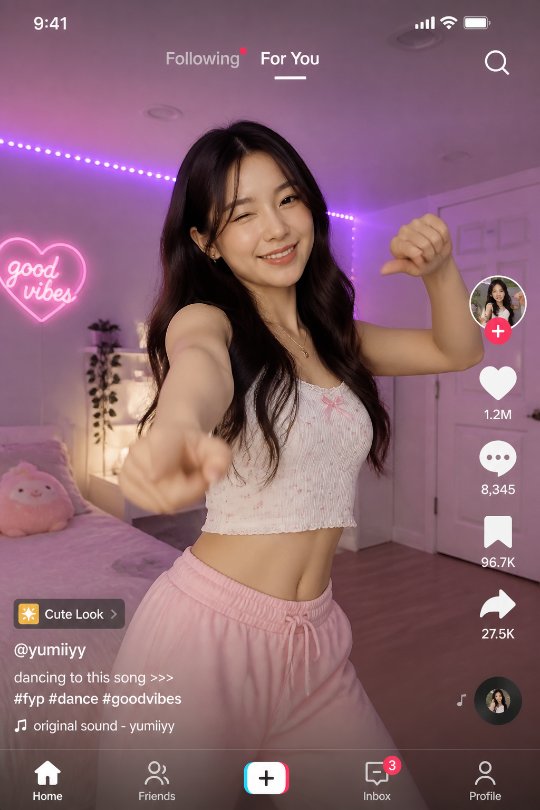
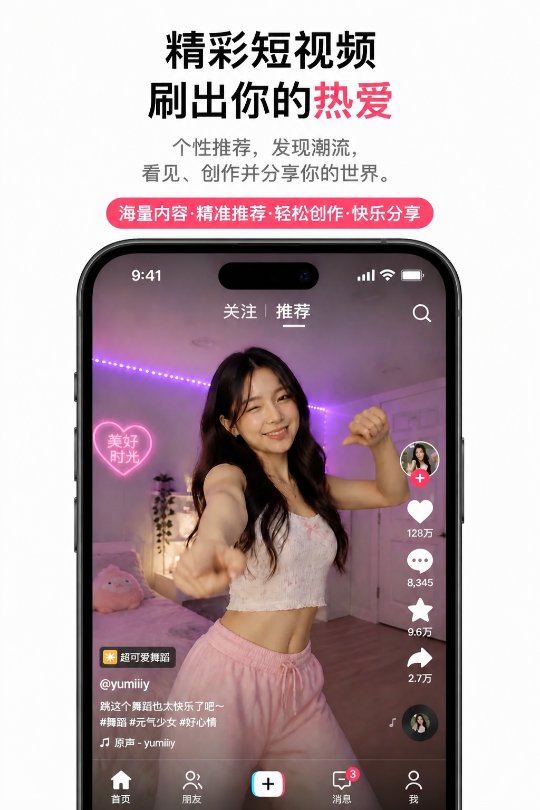
AI generates your screenshots. Localized into 39 languages & regions.

Screenshots make or break the install — yet localizing them for every market is the worst manual grind. Slothy generates them, rewrites the on-screen copy per language with AI, and pushes it all to App Store Connect — metadata and release notes included.
39 languages & regions iOS · macOS · tvOS · visionOS Submit for review, built in
slothy — Screenshot Studiolocalizeupload
LOCALES
en-US 10
ja 10
zh-Hans 7
ko 5
de-DE +
en-US · iPhone 6.9″
English App Store screenshoten
Japanese App Store screenshotja
Korean App Store screenshotko
German App Store screenshotde
French App Store screenshotfr
AI
generating…
LOCALES39 at once
AIGenerates screenshots
ASC Submitted

// The problem

Localized screenshots are the worst part of shipping globally

Every market needs screenshots with native-quality on-screen copy. That means re-designing, re-translating, and re-exporting per locale — for every update.

  • Screenshot copy has to be rewritten for each market — a literal translation falls flat
  • Re-exporting design files for 10+ locales eats hours every release
  • Metadata and keywords also differ by market and have strict limits
  • App Store Connect was not built for batch uploads across locales
LIVE FLOW

One prompt becomes a store in 39 languages & regions.

Scroll to watch a single prompt turn into a localized store, ready to submit.

  1. 01
    Reference & promptPick your app screen
  2. 02
    AI generatesOne screenshot
  3. 03
    Localize all 39Every market
  4. 04
    Upload to App StoreSubmit & ship
AI Screenshotsgenerate
Reference app screen
reference · your app screenapp-screen.png ✓ selected
prompt>
Generated App Store screenshot, English
generating…
App Store screenshot, Englishen 🇺🇸
App Store screenshot, Japaneseja 🇯🇵
App Store screenshot, Chinesezh 🇨🇳
App Store screenshot, Koreanko 🇰🇷
App Store screenshot, Germande 🇩🇪
App Store screenshot, Frenchfr 🇫🇷
App Store screenshot, Spanishes 🇪🇸
App Store screenshot, Portuguesept 🇧🇷
App Store screenshot, Vietnamesevi 🇻🇳
App Store screenshot, Italianit 🇮🇹
App Store ConnectUploading 0%
KEYWORDS · LOCALIZED, NOT TRANSLATED

Keywords that rank in every market.

Scroll to watch literal keyword translations — over the 100-character limit — become the real search terms each region actually uses.

  1. 01
    English keywordsOne source set
  2. 02
    Not a literal translationReal regional search terms
  3. 03
    Within the 100-char limitPushed to App Store
Store Metadata · Keywords · EN → 39localize
EN Keywords · source98 / 100
short video editor, clips, reels, vlog, effects, filters, music, captions, montage, stickers, free
0/ 39 localized
ja 🇯🇵
118/100ショートビデオ,クリップ,リール,ブイログ,ビデオエディター,編集,共有,作成,エフェクト,フィルター,ミュージック,ストーリー,モンタージュ,ステッカー,無料literal ✕
99/100動画編集,ショート動画,縦動画,加工,エフェクト,フィルター,BGM,おしゃれ,スタンプ,テロップ,作り方,簡単,無料regional ✓
ko 🇰🇷
121/100짧은 동영상,클립,릴스,브이로그,비디오 편집기,편집,공유,제작,효과,필터,음악,스토리,몽타주,스티커,무료literal ✕
98/100영상편집,숏폼,브이로그,릴스,꾸미기,효과,필터,스티커,배경음악,자막,템플릿,무료,만들기regional ✓
zh 🇨🇳
112/100短视频,剪辑,Reels,视频博客,视频编辑器,编辑,分享,制作,特效,滤镜,音乐,故事,蒙太奇,贴纸,免费literal ✕
96/100视频剪辑,短视频,vlog,特效,滤镜,贴纸,配乐,字幕,模板,制作,教程,免费,卡点regional ✓
de 🇩🇪
112/100Kurzvideo,Clips,Reels,Vlog,Video-Editor,bearbeiten,teilen,erstellen,Effekte,Filter,Musik,Story,Montage,kostenlosliteral ✕
98/100Videobearbeitung,Kurzvideos,Reels,Effekte,Filter,Musik,Vorlagen,Status,Untertitel,erstellen,gratisregional ✓
fr 🇫🇷
110/100vidéo courte,clips,reels,vlog,éditeur vidéo,éditer,partager,créer,effets,filtres,musique,story,montage,gratuitliteral ✕
97/100montage vidéo,vidéos courtes,reels,effets,filtres,musique,modèles,sous-titres,story,créer,gratuitregional ✓
es 🇪🇸
106/100video corto,clips,reels,vlog,editor de vídeo,editar,compartir,crear,efectos,filtros,música,historia,gratisliteral ✕
93/100editor de vídeo,vídeos cortos,reels,efectos,filtros,música,plantillas,subtítulos,crear,gratisregional ✓
Literal translation ✕ → within 100 chars, regional search terms ✓
HOW

From generate to publish, in one flow.

Slothy takes the four steps that slow your release. You review, and you approve.

[01] AI SCREENSHOTS

Generate screenshots. Localize the on-screen copy with AI.Generate, then localize the words

Create marketing screenshots from a prompt or template. AI rewrites the on-screen text into natural, native-quality copy for every locale — same layout, market-ready in seconds.

  • 3 templates (blurred bg / white bg / full gradient) blended with AI slides
  • Multiple locales × up to 10 slides per project
  • Exported at full App Store spec resolution
AI Screenshots
prompt> White background with the app screen in the center
enEnglish screenshot
jaJapanese screenshot
zhChinese screenshot
koKorean screenshot
AI · tuned per locale
[03] STORE METADATA

Names, keywords, descriptions — ASO-tuned per localeASO that respects every limit

Translate and optimize title, subtitle, keywords, promotional text, and description within Apple's character limits — plus release notes. Edit in one place, publish to ASC.

  • Auto-respects 30 / 100 / 4,000-character limits
  • Market-fit copy per locale, not literal translation
  • Optimize by field, or every locale at once
Store Metadata · en-US
name26 / 30
Slothy — Localize your store
subtitle27 / 30
AI screenshots & ASO, batched
keywords96 / 100
screenshots,localize,ASO,App Store,translate,review…
description1240 / 4000
Automate the busywork of every release…
AI · market-fit 39 languages & regions
[02] UPLOAD TO ASC

Push localized sets straight to App Store ConnectScreenshots + metadata, together

No more uploading locale by locale. Slothy pushes every localized screenshot set — plus the metadata that changed — to the right App Store locale, in the right order, in one action.

  • Screenshots and metadata in one upload
  • Replace or append shots · push only changed metadata
  • Live per-locale status · reorder & delete on ASC
App Store Connect
iOS App · 1.2.0 Prepare for Submission
🌐 English (U.S.) 39 languages & regions
6.9″ Display6.5″ DisplayiPad 13″
App Store screenshot 1
App Store screenshot 2
App Store screenshot 3
+
Keywordsshort video editor,clips,reels,vlog,effects…98/100
DescriptionGenerate, localize, and submit every release…
Screenshots + metadata✓ Saved
[04] ASC WORKFLOW

Connect once. Submit from the same workspace.Every platform, one screen

Manage versions, assign builds, submit for review, and release — without tab-hopping through App Store Connect. Studio plan adds multi-workspace for agencies.

  • Auto-detects editable version states
  • Tracks release status after publish
  • One-click publish from pending release
App Release · v2.1.0 iOS
METADATAPushed to all locales
BUILD ASSIGNEDBuild 2.1.0 (482) assigned
IN_REVIEWIn review
4
PENDING_RELEASEWaiting for manual release

// How it works

Three steps to market-ready screenshots

  1. 01

    Connect & design once

    Connect your App Store Connect account and Slothy pulls in your apps. Then generate screenshots from a prompt or template.

  2. 02

    Localize with AI

    Slothy rewrites the on-screen copy for every target language — plus your metadata and release notes.

  3. 03

    Upload to App Store Connect

    Review, then push localized screenshot sets and metadata to the right locales in bulk.

// Pricing

Start free. Scale when you ship more.

Every plan includes App Store Connect sync, AI localization, and the screenshot studio. Free covers up to 5 locales — upgrade to go global.

  • Free

    Free

    1 workspace · 1 screenshot project · up to 5 locales

    [ START FREE ]
  • Pro

    // RECOMMENDED

    $4.99/mo

    1 workspace · unlimited screenshots · all locales, one-run translation

    [ GET STARTED ]
  • Studio

    $19.99/mo

    5 workspaces · unlimited screenshots · all locales, one-run translation

    Need more than 5 workspaces? Contact us.

    [ GET STARTED ]
// FAQ

Frequently asked questions

What Slothy does, in plain terms.

What is Slothy?
Slothy is an AI-powered App Store Optimization (ASO) tool that generates App Store screenshots, localizes their on-screen text into 39 languages and regions, and publishes them — along with metadata and release notes — directly to App Store Connect.
Does Slothy generate App Store screenshots with AI?
Yes. Slothy generates App Store screenshots with AI and automatically rewrites the on-screen copy for each market, so you don't design a separate set for every language by hand.
How many languages and regions does Slothy support?
Slothy localizes screenshots and metadata into 39 languages and regions within a single workspace.
Does Slothy connect to App Store Connect?
Yes. Slothy connects to App Store Connect through the official API, so generated screenshots, metadata, and release notes can be uploaded and submitted for review without leaving the app.
Can Slothy localize metadata and release notes too?
Yes. Beyond screenshots, Slothy translates and manages store metadata (name, subtitle, keywords, description) and release notes for every locale in the same workspace.
Is there a free plan?
Yes. You can start with Slothy for free, then upgrade to a paid plan as your localization and screenshot needs grow.